Provider Spines Mapping Overview
Goal
Given any list of provider names and addresses, we want to identify NPIs for each provider.
Then, we need to first know the universe of all NPIs, their names and addresses.
Definitions:
provider registry: the universe of all NPIs (NPPES, Definitive)target file: the given list of providers (names, addresses) to map to NPIs
Steps
- Build complete provider registry
- Pre-process the registry and target file
- Record linkage between target file and provider registry
1 Build Provider Registry
NPPES (National Plan and Provider Enumeration System) is the source of the NPI registry. It is a system managed by CMS that assigns NPIs to health care providers and organizations.
The NPPES NPI registry is publicly available here: https://npiregistry.cms.hhs.gov/search; and allows full data downloads here: https://download.cms.gov/nppes/NPI_Files.html.
The site publishes a .ZIP file monthly, which contains four CSV files:
- NPPES_Data_Dissemination_October_2025_V2/npidata_pfile_20050523-20251012.csv
- NPPES_Data_Dissemination_October_2025_V2/pl_pfile_20050523-20251012.csv
- NPPES_Data_Dissemination_October_2025_V2/othername_pfile_20050523-20251012.csv
- NPPES_Data_Dissemination_October_2025_V2/endpoint_pfile_20050523-20251012.csv
TQ downloads and maintains a copy of the first file, npidata_pfile_20050523-20251012.csv,
which is stored in tq_production.reference_legacy.ref_cms_nppes_npi.
However, the other three files are not currently stored in reference data (as of Nov 2025).
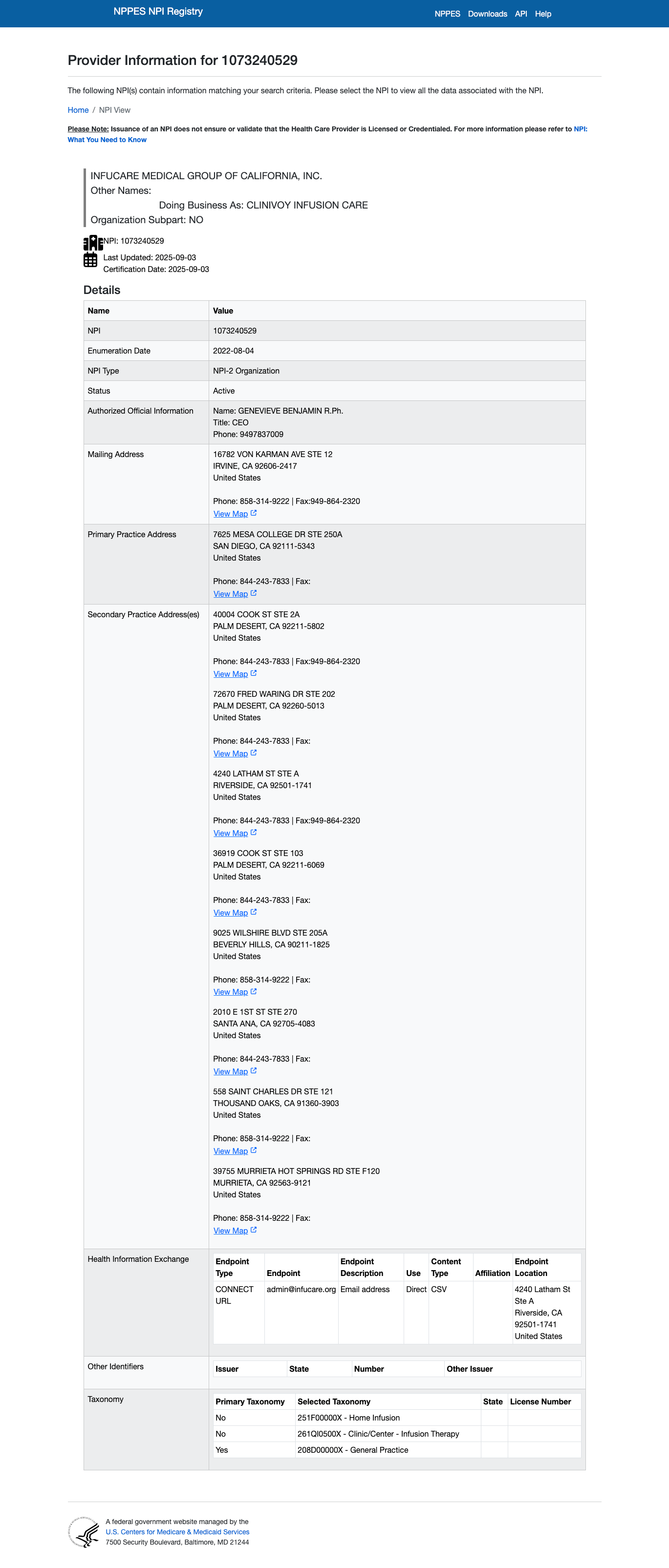
The secondary locations may be particularly important - as the target files may contain addresses that are not the primary practice location.
Here's an example of an NPI w/ a secondary name and multiple practice locations:
NPPES NPI Example
tq_production.reference_legacy.ref_cms_nppes_npi does not contain the secondary
name (e.g. "Doing Business As 'CLINIVOY INFUSION CARE')
2 Pre-process Provider Registry and the Target File
We can make the record linkage process easier by pre-processing names and addresses.
Provider Names
Provider names may contain names of individuals (e.g. GENEVIEVE BENJAMIN R.Ph.) or organizations (e.g. CLINIVOY INFUSION CARE).
Individual Names
Individual names can be pre-processed using python packages like nameparser,
probablepeople or nominally. These packages use rules and/or ML to parse
individual names into components like first name, last name, title, suffix, etc.
using nameparser:
from nameparser import HumanName

name = HumanName("GENEVIEVE BENJAMIN R.Ph.")

print("Full Name:", name)
print("First Name:", name.first)
print("Last Name:", name.last)
print("Title:", name.title)
print("Suffix:", name.suffix)
print("Middle:", name.middle)
Expected Output:
Full Name: GENEVIEVE BENJAMIN R.Ph.
First Name: Genevieve
Last Name: Benjamin
Title:
Suffix: R.Ph.
Middle:
Using probablepeople
import probablepeople as pp

text = "GENEVIEVE BENJAMIN R.Ph."
result, type_ = pp.tag(text)

print("Result:", result)
print("Type:", type_)
Expected Output (approximate):
Result: {
'GivenName': 'GENEVIEVE',
'Surname': 'BENJAMIN',
'SuffixOther': 'R.Ph.'
}
Type: Person
Using nominally
from nominally import Parser

parser = Parser()
parsed = parser.parse("GENEVIEVE BENJAMIN R.Ph.")

print(parsed.components)
Expected Output:
{'first': 'GENEVIEVE', 'last': 'BENJAMIN', 'suffix': 'R.Ph.'}
Organization Names
Organization names can be pre-processed using a variety of text normalization and entity-standardization techniques.
-
Lower- or Upper- casing
Makes comparison case-insensitive. -
Removing punctuation & special characters
E.g. converting ST. MARY’S-HOSPITAL → st marys hospital. -
Removing extra whitespace
Normalizing multiple spaces, tabs, line breaks. -
Removing stopwords
For example: the, and, of, or organization-specific stopwords such as
inc, llc, corp, health system, medical center, etc. -
Expanding or normalizing abbreviations
Examples:- Ctr → Center
- Hosp → Hospital
- Hlth → Health
- Univ → University
-
Stemming / Lemmatization
Useful when organization names vary slightly by word forms (e.g. clinics → clinic).
Addresses
Addresses can be pre-processed using the usaddress python package, which uses
probabilistic parsing to break down US addresses into components like street
number, street name, city, state, zip code, etc.
-
Lower- or Upper- casing and punctuation removal
Useful for consistent comparison. -
Standardizing street suffixes
E.g. St → Street, Rd → Road, Ave → Avenue.
(USPS publishes a full standardization table.) -
Standardizing directional indicators
E.g. N. → North, SW → Southwest. -
Expanding or normalizing unit indicators
E.g. Apt, Ste, Suite, #, Unit → a consistent form. -
Removing extraneous tokens
Examples: trailing punctuation, unmatched parentheses, random building codes. -
ZIP code normalization
- Ensuring 5-digit ZIPs
- Normalizing ZIP+4 (e.g. removing hyphens if desired)
-
Geolocation / canonicalization (optional)
Tools like USPS APIs, SmartyStreets, or Google Maps may be used to:- Validate an address
- Correct misspellings
- Provide a canonical (standardized) version